
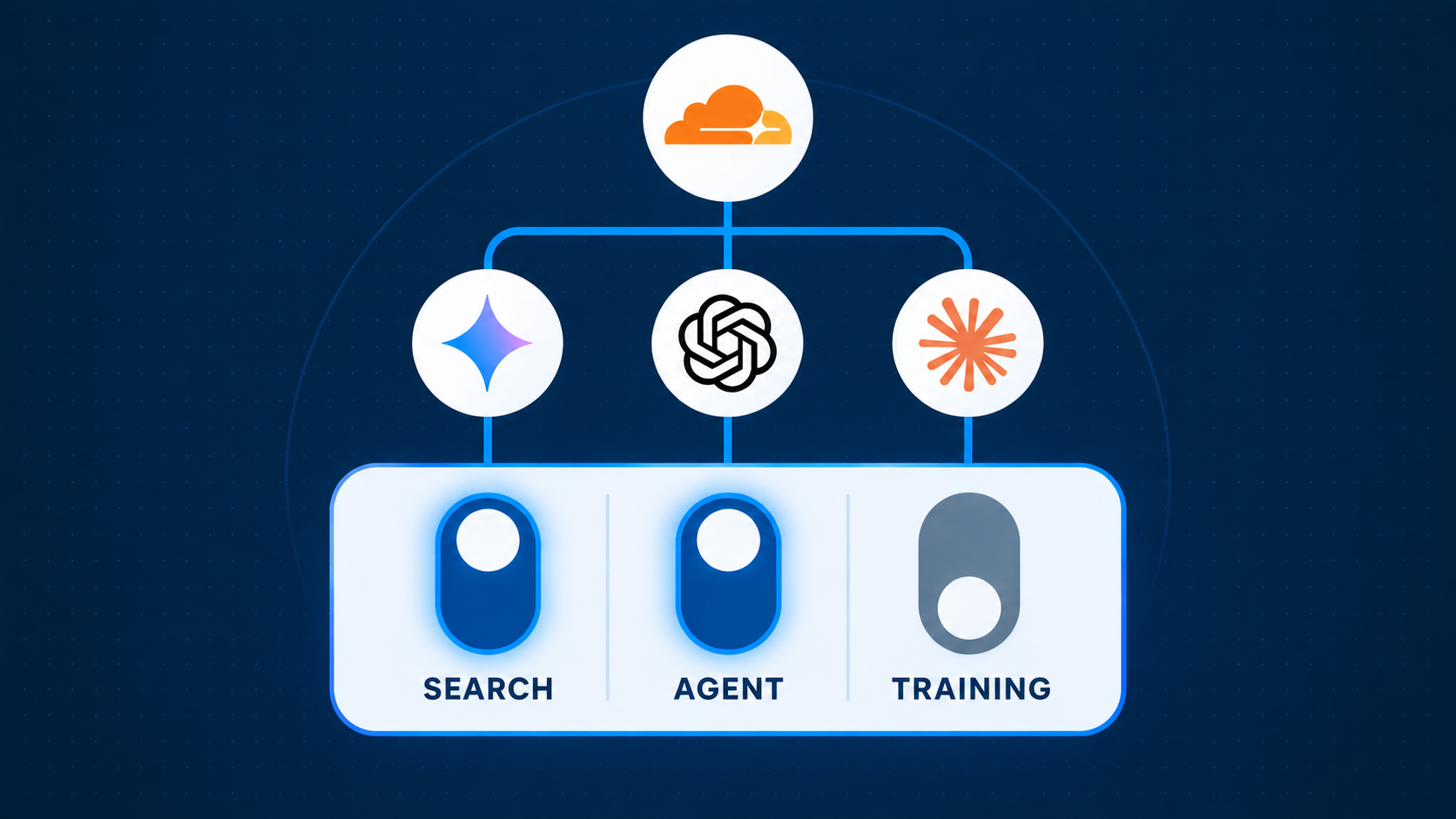
On Tuesday 15 September, one company quietly changed how a large share of the internet talks to AI. Cloudflare sits in front of roughly a fifth of all websites, including a great many Irish business sites that arrived there through a hosting provider or web agency. If your site is one of them, your AI settings may have changed this week without anyone touching them.
The change itself is sensible. The default it ships with is not, at least not for most businesses. This post explains what happened, what "AI training on your content" really means, and how to set the new switches so the customers who should find you still can.
What actually changed
Until this week Cloudflare offered a single switch: block AI bots, or do not. As of 15 September it has been replaced with three separate controls, available on every plan including the free tier:
- Search. Lets AI search engines such as ChatGPT, Claude, Perplexity and Google Gemini index your pages and cite you in answers.
- Agent. Lets AI assistants read or act on your site on behalf of a real person, for example checking your opening hours or filling in your contact form.
- Training. Lets AI companies use your content to train future models.
For each of the three you can choose Allow, Block on pages with ads, or Block on all pages. The new defaults apply to every new domain added to Cloudflare, and free-plan sites are reported to be included. On pages that show ads, Training and Agent are now blocked by default. Search stays on. Alongside this, Cloudflare's Pay Per Crawl scheme is becoming Pay Per Use, which lets publishers charge AI companies when their content shapes an answer rather than simply when it is fetched.
Why this matters more than it sounds
Think about how a prospective customer found you two years ago. They typed "accountant Galway" into Google, scrolled a page of results, and clicked two or three. Now a growing number of them ask ChatGPT, Claude, Perplexity or Google's AI Overview the same question and read a single answer that names two or three firms.
Those answers are built from what AI crawlers can read. If the Search and Agent crawlers cannot reach your site, you are not in the answer. Not ranked lower. Absent. The people in marketing already have a name for this, Answer Engine Optimisation, and it is becoming to AI search what SEO was to Google.
That is the risk with a default that blocks Agent traffic. An AI assistant asked to "find me three AI consultants in Ireland and check which ones offer training" will simply skip the sites it cannot open.
The honest case for blocking AI training
The Training switch is the one that gets the headlines, and there are real reasons a business might want it off:
- You get nothing back. A search crawler sends visitors. A training crawler takes a copy of your writing and leaves. There is no traffic, no attribution and, until schemes like Pay Per Use mature, no payment.
- Your content becomes generic. If you publish original guides, pricing analysis or research, a model that has trained on them can reproduce the substance of that work for anyone who asks, without ever mentioning you.
- Cost and control. Training crawlers are heavy and often revisit pages that have not changed. On a small hosting plan that is bandwidth you pay for.
- The principle. Some owners simply do not want their work used to build a commercial product they have no say in. That is a legitimate position.
Why it may not be much of a concern either
For most service businesses, the calculation looks different once you consider what is actually on the site:
- Your public pages are already public. A homepage, a services list, an about page and a few blog posts are marketing material. They exist to be read as widely as possible. A model learning that your firm does bookkeeping in Limerick is not a leak.
- Training is a snapshot, not surveillance. A crawler takes a copy at a point in time. It does not watch your site, read your customer data or see anything behind a login. Anything genuinely confidential should not be on a public URL in the first place, crawler or no crawler.
- Being in the model can help you. Models trained on your content are more likely to know you exist, describe your services accurately and mention you when someone asks about your area. Being unknown to the model is not obviously better than being known.
- The hidden cost with Google. This is the part that has caught people out this week. Google's crawler does both search indexing and AI training as one bot, and the same goes for Bing and Apple. Cloudflare's own announcement states that these multi-purpose crawlers will be blocked for customers who choose to block Training, because the most restrictive rule wins. For a business that is a far bigger problem than any AI company reading your about page.
The short version: if you sell content, take the Training switch seriously. If you sell services, it is probably the least important of the three.
How to set the three switches
Our recommendation for a typical business:
- Search: Allow. This is how AI search engines find and cite you. There is no good reason for a business that wants customers to turn this off.
- Agent: Allow. AI assistants acting for real people are the next wave of visitors. Blocking them is like refusing phone enquiries. The exception is if you sell access to content and do not want it fetched for free.
- Training: your call. Service business with public marketing pages: leave it on, or block it only once you have confirmed Google is unaffected. Publisher or content business: block it, or look at Pay Per Use.
Whatever you choose, choose it. The problem with this week's change is not the defaults themselves but that thousands of businesses now have a setting they did not pick and do not know about.
Check your site in two minutes
- Log in to your Cloudflare dashboard (or ask whoever manages your site to).
- Select your domain, then go to Security, then Settings, and find Configure AI bot policies.
- Look at the three controls for Search, Agent and Training and set them deliberately.
- Not sure whether you are on Cloudflare at all? Send your web agency this one line: "Is our site behind Cloudflare, and if so, what are the AI bot policies set to since 15 September?"
One more thing to check: your robots.txt file
Every website has a small public file that tells crawlers what they are and are not allowed to read. It is called robots.txt, and you can see yours right now. Open a browser, type your web address and add /robots.txt to the end, so for example yourbusiness.ie/robots.txt. You will see a short list of plain text instructions. Here is what a typical one looks like:
User-agent: *
Allow: /
User-agent: GPTBot
Disallow: /
Read it like this. "User-agent" names a crawler, and the star means everyone. "Allow: /" means it can read the whole site. "Disallow: /" means it is blocked from everything. In the example above, every crawler is welcome except GPTBot, which is the crawler ChatGPT uses.
Look for lines that say Disallow: / under names like GPTBot, ClaudeBot, PerplexityBot, Google-Extended or CCBot. Plenty of agencies added these in 2024 when AI crawlers were new and never revisited them. If you find them and you want AI assistants to be able to recommend your business, ask your web team to change those lines to Allow, or remove them. If your file simply says the star and Allow, you are fine.
Our view
Default to visible. For most businesses the upside of an AI assistant recommending you far outweighs the downside of a model reading your services page. Block deliberately if you have a reason, never by accident.
At Barniville AI Consulting we look at this as part of the AI readiness work we do with clients, because being findable by AI is quickly becoming as fundamental as being findable by Google. If you would like more tips on improving overall AI efficiency within your business, or you want us to check where your site stands, book a call and we will take a look together.